Change camera and feedback settings
Open Settings > Config… in the main window. The General tab has the camera and feedback settings. The Advanced tab has the eye and head baseline settings.
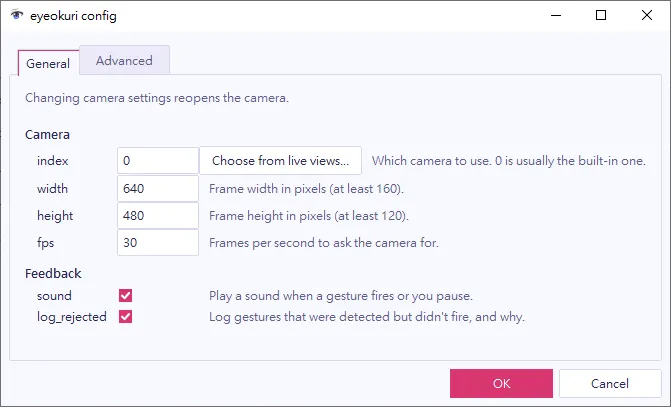
Choose a camera
Section titled “Choose a camera”Changing a camera setting reopens the camera.
| Setting | Meaning |
|---|---|
| index | Which camera to use. 0 is usually the built-in one. |
| width, height | The frame size in pixels. |
| fps | The frames per second to ask the camera for. |
If you have several cameras, select Choose from live views… next to index. eyeokuri lists every camera it finds with its live view. Select the one to use.
Control sounds and the log
Section titled “Control sounds and the log”- sound plays a sound when a gesture fires or when you pause or resume.
- log_rejected logs gestures that were detected but didn’t fire, with the reason.
Tune the baselines
Section titled “Tune the baselines”eyeokuri learns your usual open-eye level and your usual head position, and keeps adapting as your posture changes. The Advanced tab sets how it learns:
- baseline_window_s is how many seconds of history it uses. Try 5 for the eyes if lighting or distance changes quickly. Raise it for the head if looking away for a while shifts your zero.
- warmup_s is how many seconds it learns before gestures can fire. It must be below the window.
- require_both_eyes requires both eyes to close, so a wink doesn’t count.
Change the language
Section titled “Change the language”The window follows your Windows display language when eyeokuri has a translation for it, and uses English otherwise. To pick a language yourself, set language in the [app] section of config.toml to "en", "ja" or "zh-TW". The default, "auto", follows Windows. The change applies the next time you start the window.
Save or cancel
Section titled “Save or cancel”The config window works like the gesture window. eyeokuri uses your changes at once, OK saves them, and Cancel goes back to the settings you had when you opened the window.